Checkout with Confidence
Payment Security Guaranteed
Return with Ease
Fast & Hassle-Free Process
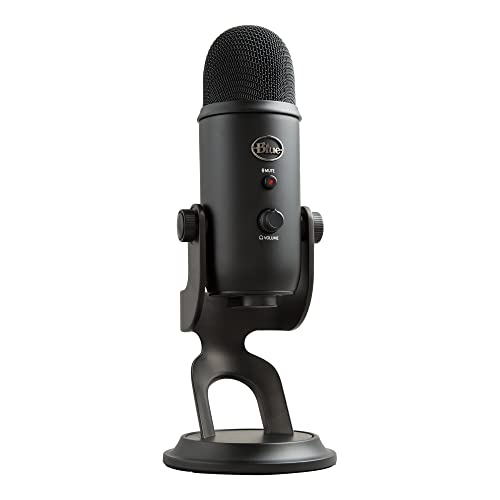
This product — Logitech for Creators Blue Yeti USB Microphone for Recording, Streaming, Gaming, Podcasting on PC and Mac, Condenser Mic for Laptop or Computer with Blue VO!CE Effects, Adjustable Stand - Black
Refer to the product listing for full specifications and care instructions. Check compatibility before purchase.
Blue Yeti USB Microphone for PC & Mac - Black, Adjustable Stand, Ideal for Streaming & Podcasting
Key Takeaway
Elevate your audio experience with the Logitech for Creators Blue Yeti USB Microphone, designed for recording, streaming, gaming, and podcasting on both PC and Mac. Priced at just 99.97, this high-quality condenser mic features Blue VO!CE effects and an adjustable stand, making it perfect for content creators who want to deliver professional sound without the hassle. Whether you're a gamer, podcaster, or musician, this microphone will help you sound your best!
Frequently Asked Questions
What is Logitech for Creators Blue Yeti USB Microphone?
The Logitech for Creators Blue Yeti USB Microphone is a versatile condenser microphone designed for recording, streaming, gaming, and podcasting. It connects easily to both PC and Mac via USB, making it a popular choice among content creators.
How much does Logitech for Creators Blue Yeti USB Microphone cost?
The Logitech for Creators Blue Yeti USB Microphone is priced at $99.97. This price reflects its high-quality audio performance and features, making it a great value for both amateur and professional creators.
What are the key features of Logitech for Creators Blue Yeti USB Microphone?
Key features of the Blue Yeti microphone include Blue VO!CE effects, an adjustable stand, and multiple polar patterns for versatile recording options. It also boasts a high-resolution audio capture, ensuring clear sound quality for any application.
Who is Logitech for Creators Blue Yeti USB Microphone best for?
The Blue Yeti microphone is ideal for podcasters, streamers, and gamers looking for professional-quality audio. Its user-friendly design makes it suitable for both beginners and experienced creators.
How do I use/care for Logitech for Creators Blue Yeti USB Microphone?
To use the Blue Yeti microphone, simply connect it to your computer via USB and select it as your audio input device. For care, keep it in a dry environment and use a pop filter to minimize unwanted noise during recordings.
Fast Delivery
Quick & reliable shipping
Secure Shopping
100% secure transactions
Great Prices
Competitive deals daily
Expert Support
Here to help you choose
More Products You Might Like from podcasting
View All


Please Note: When you order through these links, we may earn a commission at no additional cost to you.